Case Study
Automated Linux Deployment of LANBox — a File Sharing Platform
LAN Device → Linux Server → Docker → Nginx → LANBox Backend → Filesystem
Executive Summary
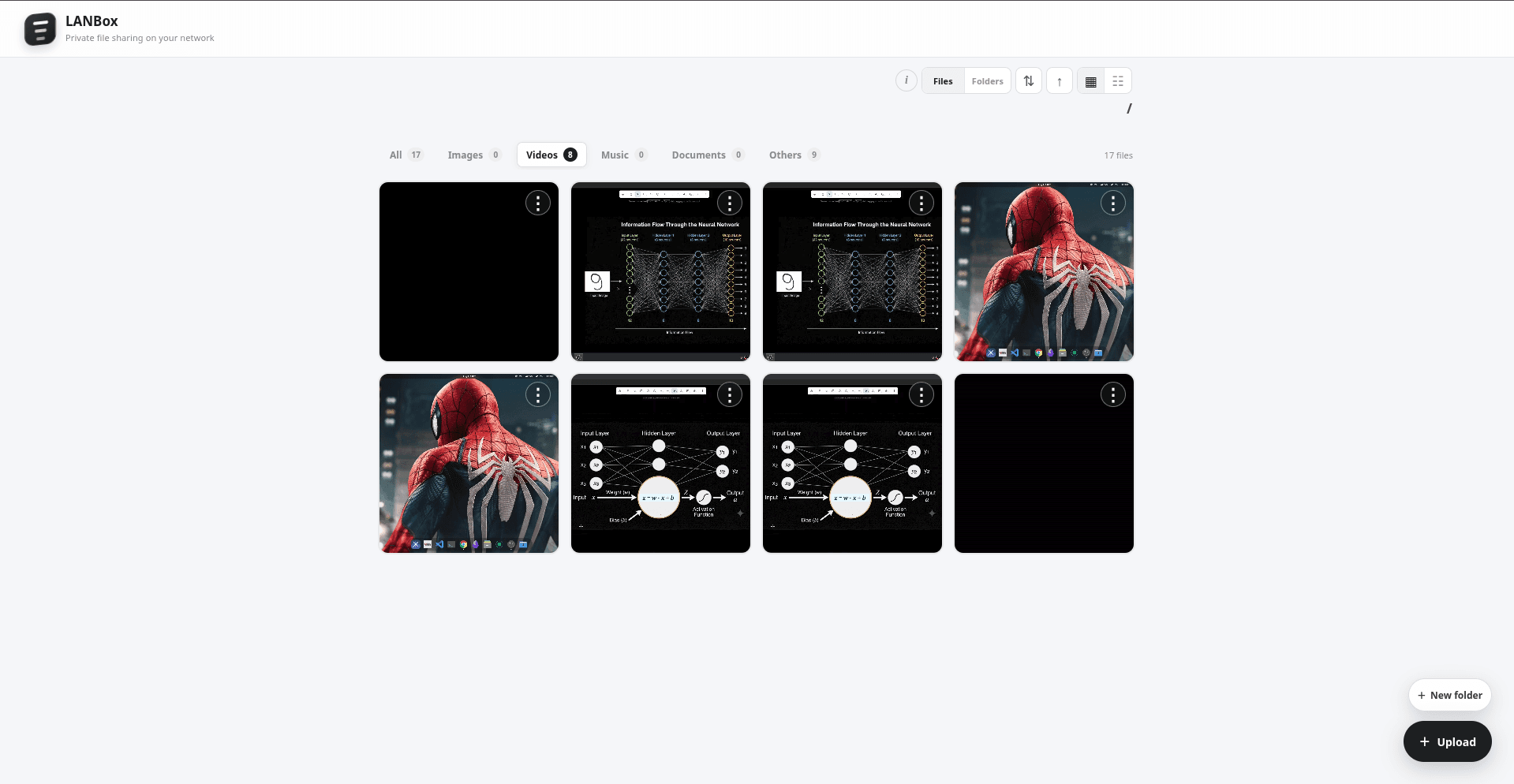
LANBox is a self-hosted LAN file-sharing and file-management platform designed to allow devices on the same network to browse, upload, download, and manage files through a web browser without requiring a cloud storage service.
The project was built as a practical systems and DevOps exercise, focusing on Linux deployment, Docker containerization, networking, Nginx configuration, pre-built container distribution, and deployment automation.
Technologies Used: Linux, Docker, Docker Compose, Node.js, React, Nginx, GitHub Container Registry (GHCR)
Key Highlights:
- Self-hosted file management over a private LAN
- Browser-based access from phones, laptops, and other LAN devices
- Containerized frontend and backend using Docker
- Pre-built Docker images distributed through GHCR
- Automated Linux installation without requiring the source repository
- Deployed alongside another Docker Compose application on the same server
1. System Architecture
                                                 ┌─── LANBox Backend → Filesystem
LAN Device → Linux Server → Docker Compose → Nginx →  LANBox Frontend
| Layer | Technology | Purpose |
|---|---|---|
| Client | Web Browser | Access files and interact with LANBox |
| Network | LAN | Provides private network access to the application |
| Host | Linux Server | Runs and manages the LANBox deployment |
| Frontend | Docker + Nginx | Serves the web interface |
| Backend | Node.js | Handles file and folder operations |
| Storage | Linux Filesystem | Stores files and folders managed through LANBox |
2. Application Design
LANBox provides a browser-based interface for interacting with files stored on the Linux server. The application separates the frontend interface from the backend responsible for filesystem operations.
Core functionality:
- Browse files and folders
- Create folders
- Upload files
- Download files
- Delete files and folders
- Browse images, videos, music, and other file types
- Access the application from multiple devices on the LAN
The design keeps the client devices simple: users only need a modern web browser. The Linux server handles the application runtime and filesystem access.
3. Docker Deployment
LANBox was containerized into separate frontend and backend services. Docker Compose is used to manage the application as a single deployment unit.
LANBox
├── frontend container
│   └── Nginx
│
└── backend container
    └── Node.js
└── Linux filesystem- Frontend image: ghcr.io/mrtuxcoder/lanbox-client:latest
- Backend image: ghcr.io/mrtuxcoder/lanbox-server:latest
- Frontend exposed on port 80
- Backend runs internally on port 3000
- Docker Compose manages both services together
Using pre-built images means the production server does not need the LANBox source code or a local build environment to run the application.
4. LAN Networking
LANBox was designed primarily for private network access. The Linux server exposes the frontend through port 80, allowing other devices connected to the same network to open the application directly using the server's LAN IP address.
Phone / Laptop
      │
      │ HTTP :80
      ▼
Linux Server
      │
      ▼
LANBox Frontend
      │
      ▼
LANBox Backend
      │
      ▼
Filesystem- Frontend exposed through TCP port 80
- Backend remains an internal application service
- LAN devices can access LANBox without installing a client application
- Tested access from mobile and other connected devices
This deployment also provided practical experience with the difference between an application listening on a server.
5. Automated Linux Installation
LANBox includes an automated Linux installer that deploys the application without requiring users to clone the source repository. Docker must already be installed, while the installer verifies and starts the required services.
Linux Machine
     │
     ▼
Run Installer with sudo
     │
     ▼
Check Docker & Compose
     │
     ▼
Create /opt/lanbox
     │
     ▼
Create .env
     │
     ▼
Download Compose File
     │
     ▼
Pull Images from GHCR
     │
     ▼
Start LANBox
     │
     ▼
Verify Containers
     │
     ▼
Show LAN IP
Installation workflow:
- Run the installer with sudo
- Verify and start Docker and Docker Compose
- Create the
/opt/lanboxdeployment directory - Generate the required
.envconfiguration - Download and validate the Docker Compose file
- Pull LANBox images from GHCR
- Start and verify the LANBox containers
- Display the server's LAN IP for browser access
This provides a repeatable self-hosting workflow that automatically configures, deploys, verifies, and exposes LANBox on the local network.
6. Running Multiple Services on One Server
LANBox was deployed on the same Linux homelab server that also runs Chronicle. The two applications use separate Docker Compose projects and expose different frontend ports.
Linux Homelab
│
├── Chronicle Compose Project
│   ├── Frontend → :8080
│   ├── Backend
│   └── MongoDB
│
└── LANBox Compose Project
    ├── Frontend → :80
    └── Backend → internal :3000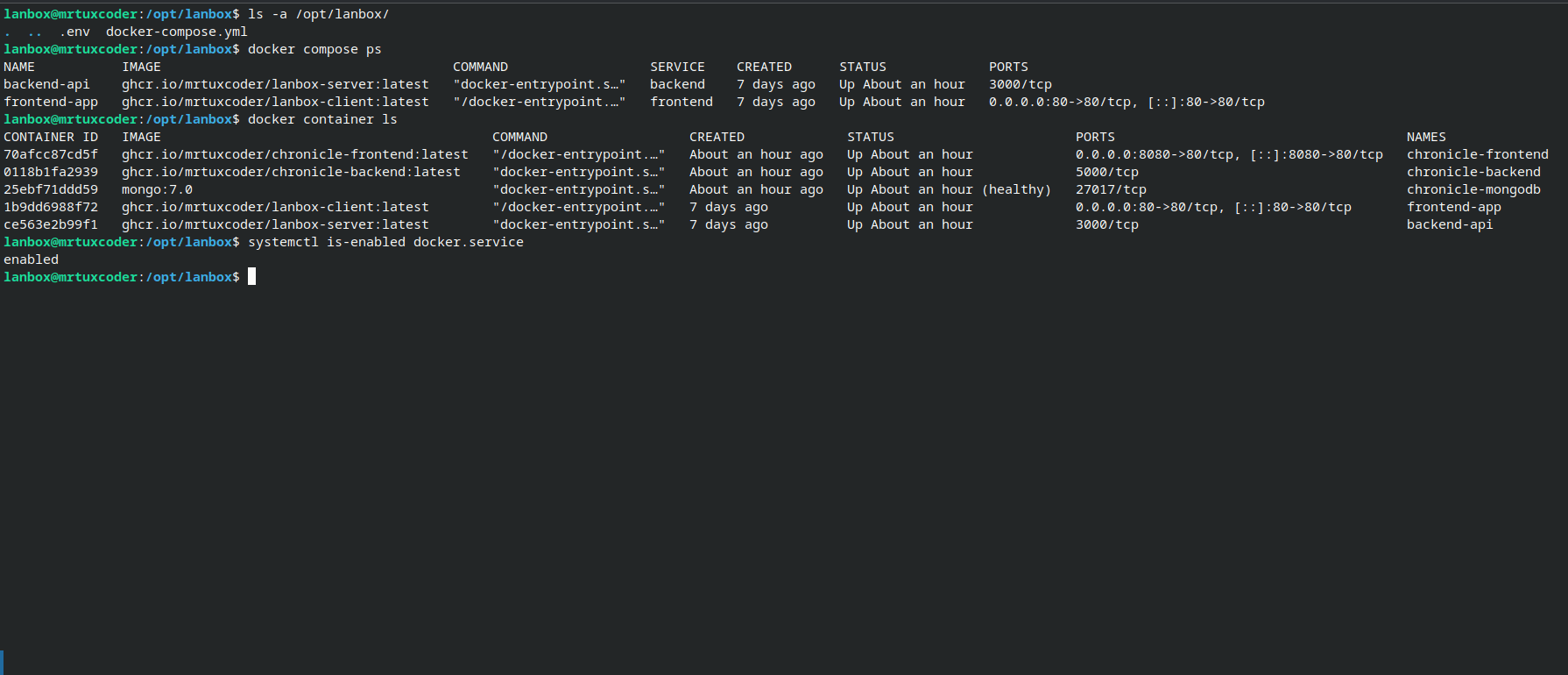
This deployment required understanding port publishing, container networking, service isolation, and how multiple Compose applications can coexist on the same Linux host.
7. Deployment Challenges
LAN Connectivity
Access from another device required the application to be reachable through the server's LAN interface rather than only through localhost. Nginx and port configuration were part of validating this behavior.
Multiple Docker Applications
LANBox and Chronicle needed to run simultaneously on the same server. Different published ports and separate Compose projects allowed both deployments to operate without conflicting with each other.
Source-Free Deployment
The installation workflow was designed around published container images rather than requiring a source-code checkout on the target machine. This made the deployment process smaller and more reproducible.
Deployment Automation
Replacing multiple manual setup steps with a single installation workflow required thinking about dependencies, Docker availability, image distribution, configuration, and service startup as one deployment process.
8. Deployment Validation
- LANBox frontend successfully running on port 80
- LANBox backend running as a separate Docker container
- Pre-built frontend and backend images available through GHCR
- LANBox accessible from a mobile device on the same network
- File browsing and management operations tested through the browser
- LANBox and Chronicle verified running simultaneously on the same server
- Docker Compose deployment verified on the Linux homelab
9. DevOps & Systems Lessons
- Linux Administration: Running a real service on a Linux host requires understanding processes, ports, networking, permissions, and system services.
- Containerization: Docker provides a consistent packaging and deployment environment for the application.
- Networking: Application connectivity depends on interfaces, Docker networking, ports working together
- Image Distribution: GHCR allows deployment machines to consume pre-built application artifacts without requiring the source repository.
- Infrastructure Automation: Installation scripts turn a collection of manual deployment steps into a repeatable workflow.
- Self-Hosting: LANBox demonstrates how an application can be deployed and operated independently on user-controlled infrastructure.
- Troubleshooting: Debugging LAN connectivity, Docker services, and application access provided practical systems-level experience.
10. Final Deployment
Source Code
     │
     ▼
Docker Build
     │
     ▼
GitHub Container Registry
     │
     ▼
Linux Installation Script
     │
     ▼
Docker Compose
     │
     ▼
Linux Homelab
     │
     ├──  LAN Networking
     │
     ▼
LANBox
     │
     ▼
Phone / Laptop / PC
LANBox evolved from a file-management application into a practical self-hosting project covering application packaging, container deployment, Linux administration, LAN networking, Nginx configuration, container registries, and installation automation.